
Spam & Scam Alert!
While the percentage of spam emails has slowly decreased over the last decade — from ~57% to around 46% — there are still ~160 billion spam emails sent every day. So, if your inbox is less than half spam, you can thank your spam filters!
Here’s one that beat the odds and slipped its way past our security to our inboxes, and how we ID’d it as a potential scam:
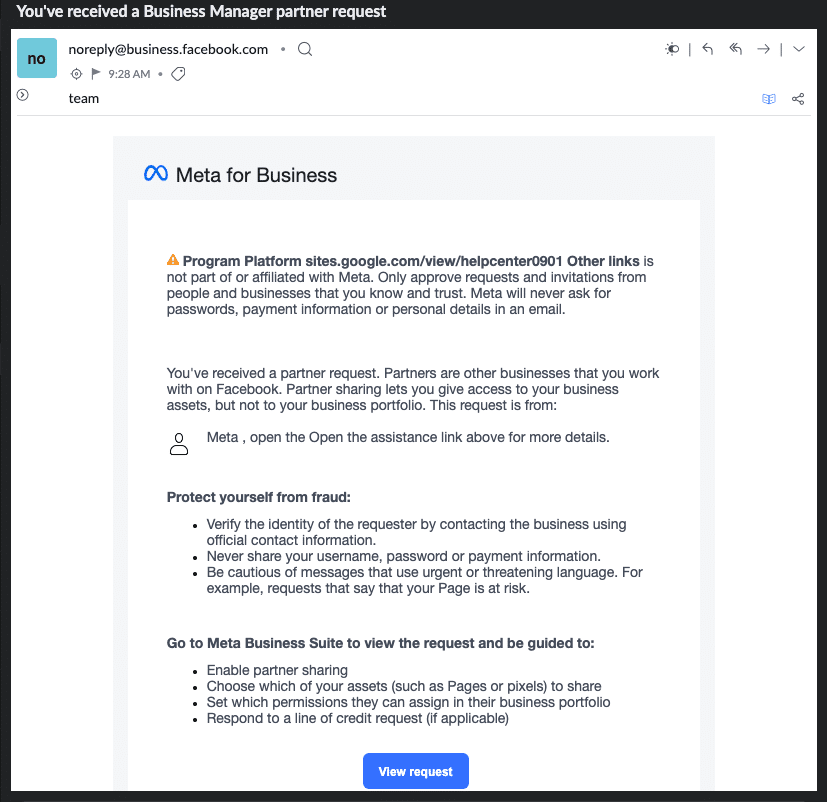
If you’re like us, recently your inbox has been hit daily by multiple “Meta Business Manager partner requests.” While you may absolutely receive legitimate requests this way, there is a trending scam abusing Meta’s invitation system. The goal is to trick organizations into granting access to their Facebook/Meta pages, ad accounts, and any associated billing information.
What to Look For
- These emails tend to look pretty convincing, and many come through the actual Meta system from a supposedly vetted “Meta Agency Partner,” “Invoice Program,” “Business Support,” etc.
- Official-looking links or buttons in the email will prompt you to “Accept” or “View” the request.
- Accepting the request may provide administrator-level access to your assets, ad budget, and even the ability to lock you out of your Meta account.
What to Do
- Do not click links in the email or download any attachments! This is a good general rule to follow with all emails — the most effective scams can look totally legit!
- Instead, check your Meta Business Manager dashboard by logging in directly to your official Meta Business Manager account.
- Once you’ve logged in to Business Manager, go to Settings > Requests > Received.
- If you don’t see any pending requests, there’s a good chance the email was a spoofed phishing attempt.
- If there are requests, check before you accept anything! Carefully investigate the origin of each request to ensure it is legitimate and, most importantly, that you actually want to grant access to your sensitive account information.
Uhhh, What if I Already Clicked? Asking for a Friend…
- If you already clicked “Accept”: Go immediately to your Business Suite Settings > Partners, locate the unfamiliar “Partner,” and remove it. You should also change your password and review your active ad campaigns for any changes or discrepancies.
Remember, Scammers Count on You Clicking!
Don’t click links in emails! Instead, look up email addresses and phone numbers for customer service, be skeptical, and listen to your spidey senses.
Good Luck!